Block endless scrolling without losing your social life. Stay connected with friends while cutting out the algorithm-driven distractions.




Thousands of hours saved from brainrot
lost to Reels after opening the app just to “check a DM.”
One quick video before bed that became the whole night.
Energy and focus, drained by mindless scrolling before the day even starts.
The algorithm is designed to keep you hooked.
It's not a willpower problem. It's a design problem.
Block distractions, not apps. You choose.
Instagram Reels
The biggest time drains
YouTube Shorts
Endless autoplay loops
Explore & For You Pages
Algorithm rabbit holes
Messages & DMs
Stay connected with friends
Stories & Posts
See updates from people you follow
Your Social Life
No need to delete apps or accounts
Unlike screen time apps that lock everything, ScrollGuard surgically removes only the addictive parts while preserving genuine connections.
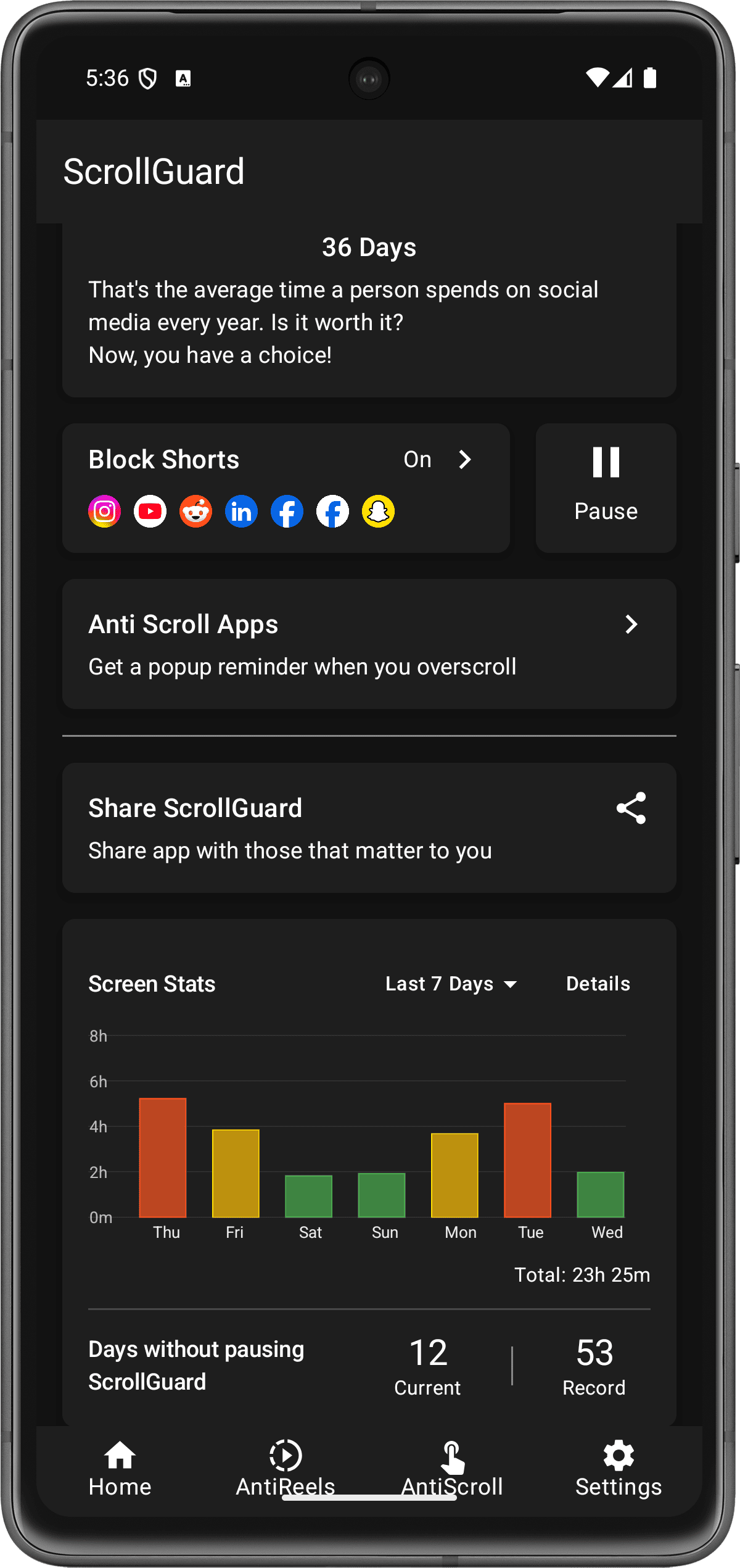
Works directly inside your apps. ScrollGuard runs on top of Instagram, YouTube, Facebook, Reddit, LinkedIn, and more, detecting and blocking short-form video feeds in real time while you use the native apps.
Remove short-form video feeds from Instagram, YouTube, Facebook, and more. The infinite scroll disappears entirely.
Instagram, YouTube, TikTok, Facebook, Reddit, LinkedIn, and Snapchat are supported on Android.
Choose exactly what to block per app. Allow Reels in DMs so you can still watch what friends send you, while blocking the feed.
Detects when you're doom scrolling and shows a popup reminder. Customizable sensitivity so it only interrupts when you're truly stuck.
Set time windows when blocking pauses, like a Sunday evening allowance. The schedule locks back on its own, so you stay strict the rest of the week without going all-or-nothing.
Lock your settings with a password and share it with an accountability partner. Prevents you from undoing your own restrictions.
Feed detection and blocking happen on your device, so the filtering itself stays local.
Works through web apps. On iPhone, ScrollGuard currently creates clean web app versions of Instagram, YouTube, and Facebook. Addictive content is blocked before it even loads, so it never reaches your screen.
Remove short-form video feeds from Instagram, YouTube, Facebook, and more. The infinite scroll disappears entirely.
Instagram, YouTube, Facebook, and X (Twitter) are currently supported on iPhone. Snapchat support is coming soon.
Choose exactly what to block per app. Allow Reels in DMs so you can still watch what friends send you, while blocking the feed.
On iPhone, ScrollGuard also blocks addictive sections in Safari-based web apps before they load, so distracting feeds never hit your screen.
Track how many hours ScrollGuard has saved you, by day, week, or month. The numbers come from Apple's Screen Time, so they match what your phone actually recorded.
Block adult sites in all browsers on your iPhone, including Safari and Chrome, using Apple's web content filter. Turning it off takes a 24 hour cooldown plus a typed confirmation, so it stays on in moments of weakness.
Lock your settings with a password and share it with an accountability partner. Prevents you from undoing your own restrictions.
Feed detection and blocking happen on your device, so the filtering itself stays local.
Lezan Ali
Finally, an app that just works. Smooth optimization, simple and user-friendly interface, and no ads at all. It delivers its purpose without clutter. Huge respect to the developers for building something this clean.
KD
Seems to work as intended, very useful app. Edit: I've used it for many months now, and I'm not scrolling anymore, at all. Potentially life changing app.
Madhusudan Payra
This isn't just a great app; this is a truly God level app. The user interface is so clean and ridiculously intuitive, you just inherently know how to use it from the second you open it. Every tap, every swipe, every single interaction is buttery smooth and instantaneous.
Anonymous User
The best app I've ever downloaded! Helps me avoid doom scrolling a lot. I still find work arounds, but this makes it much harder. Great design and awesome settings and no ads. Would recommend to anyone.
Sarah M.
Started using this during finals week and my grades actually improved. Being able to check Instagram without getting sucked into Reels was exactly what I needed.
James T.
I finished two books this month. Haven't done that in years. This app quietly does its job without being annoying about it.
No. ScrollGuard only removes short-form video feeds like Instagram Reels and YouTube Shorts. Everything else stays fully functional. You can still send messages, view stories, browse posts, watch long-form YouTube videos, and use all other features normally.
Screen time apps lock you out of entire apps or set timers that interrupt your experience. ScrollGuard takes a different approach. It removes only the addictive algorithmic feeds while keeping the useful parts of your apps working. You don't need timers, willpower, or to delete anything.
On Android, ScrollGuard works with Instagram, YouTube, TikTok, Facebook, Snapchat, Reddit, and LinkedIn. On iPhone, it currently works with Instagram, YouTube, Facebook, and X (Twitter), with Snapchat support coming soon. In every case, blocking happens on device.
Yes. ScrollGuard only blocks the Reels and Explore feeds. Your DMs, stories, posts, and notifications all work exactly the same. You can open Instagram, reply to a message, and close it, without getting pulled into an hour of Reels.
Yes, that's exactly what ScrollGuard does. It blocks the Shorts feed and Shorts suggestions while keeping regular long-form videos, your subscriptions, search, and everything else on YouTube fully accessible.
ScrollGuard lets you keep all your social media apps installed while removing the parts that cause doom scrolling, the algorithmic short-form video feeds. You keep your connections, messages, and content from people you follow, but the endless Reels, Shorts, and For You feeds are gone.
Yes. ScrollGuard is free to download and the core blocking features work without paying. There are optional premium features for extra customization like per-app controls and custom scroll detection modes. Available on the Google Play Store and Apple App Store.
ScrollGuard's content blocking works on your device. Feed detection and filtering happen locally, and the blocking flow is designed so the addictive content itself does not need to be sent anywhere to be removed. Read the full answer to whether ScrollGuard is safe.
Join thousands who've already reclaimed their time
Free to download